New / Enhanced Logics
This page describes all the engine features that are either new and introduced by Phobos or significantly extended or expanded.
New types / ingame entities
Custom Radiation Types
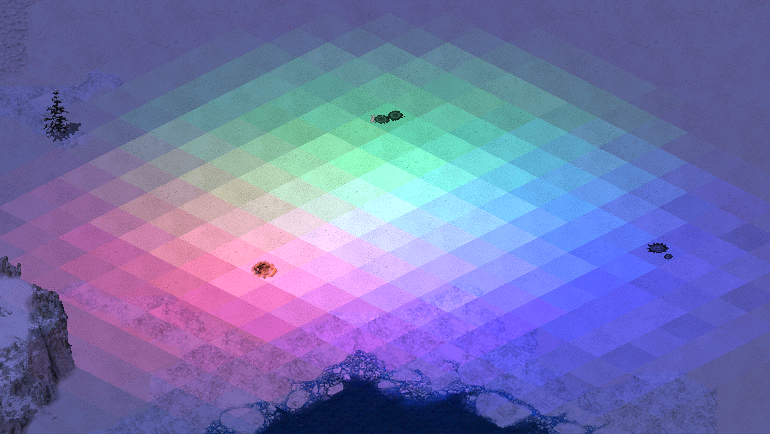 Mixing different radiation types
Any weapon can now have a custom radiation type. More details on radiation here.
There are several new properties available to all radiation types.
RadApplicationDelay.Buildingcan be set to value higher than 0 to allow radiation to damage buildings.RadSiteWarhead.Detonatecan be set to makeRadSiteWarheaddetonate on affected objects rather than only be used to dealt direct damage. This enables most Warhead effects, display of animations etc.RadHasOwner, if set to true, makes damage dealt by the radiation count as having been dealt by the house that fired the projectile that created the radiation field. This means that Warhead controls such asAffectsAllieswill be respected and any units killed will count towards that player’s destroyed units count.RadHasInvoker, if set to true, makes the damage dealt by the radiation count as having been dealt by the TechnoType (the ‘invoker’) that fired the projectile that created the radiation field. In addition to the effects ofRadHasOwner, this will also grant experience from units killed by the radiation to the invoker. Note that if the invoker dies at any point during the radiation’s lifetime it continues to behave as if not having an invoker.
By default
UseGlobalRadApplicationDelayis set to true. This makes game always useRadApplicationDelayandRadApplicationDelay.Buildingfrom[Radiation]rather than specific radiation types. This is a performance-optimizing measure that should be disabled if a radiation type declares different application delay.
In rulesmd.ini:
[RadiationTypes]
0=SOMERADTYPE

[Radiation]
UseGlobalRadApplicationDelay=true  ; boolean

[SOMEWEAPON]                       ; WeaponType
RadType=Radiation                  ; RadType to use instead of default of [Radiation]

[SOMERADTYPE]                      ; RadType
RadDurationMultiple=1              ; integer
RadApplicationDelay=16             ; integer
RadApplicationDelay.Building=0     ; integer
RadLevelMax=500                    ; integer
RadLevelDelay=90                   ; integer
RadLightDelay=90                   ; integer
RadLevelFactor=0.2                 ; floating point value
RadLightFactor=0.1                 ; floating point value
RadTintFactor=1.0                  ; floating point value
RadColor=0,255,0                   ; integer - Red,Green,Blue
RadSiteWarhead=RadSite             ; WarheadType
RadSiteWarhead.Detonate=false      ; boolean
RadHasOwner=false                  ; boolean
RadHasInvoker=false                ; boolean
Laser Trails
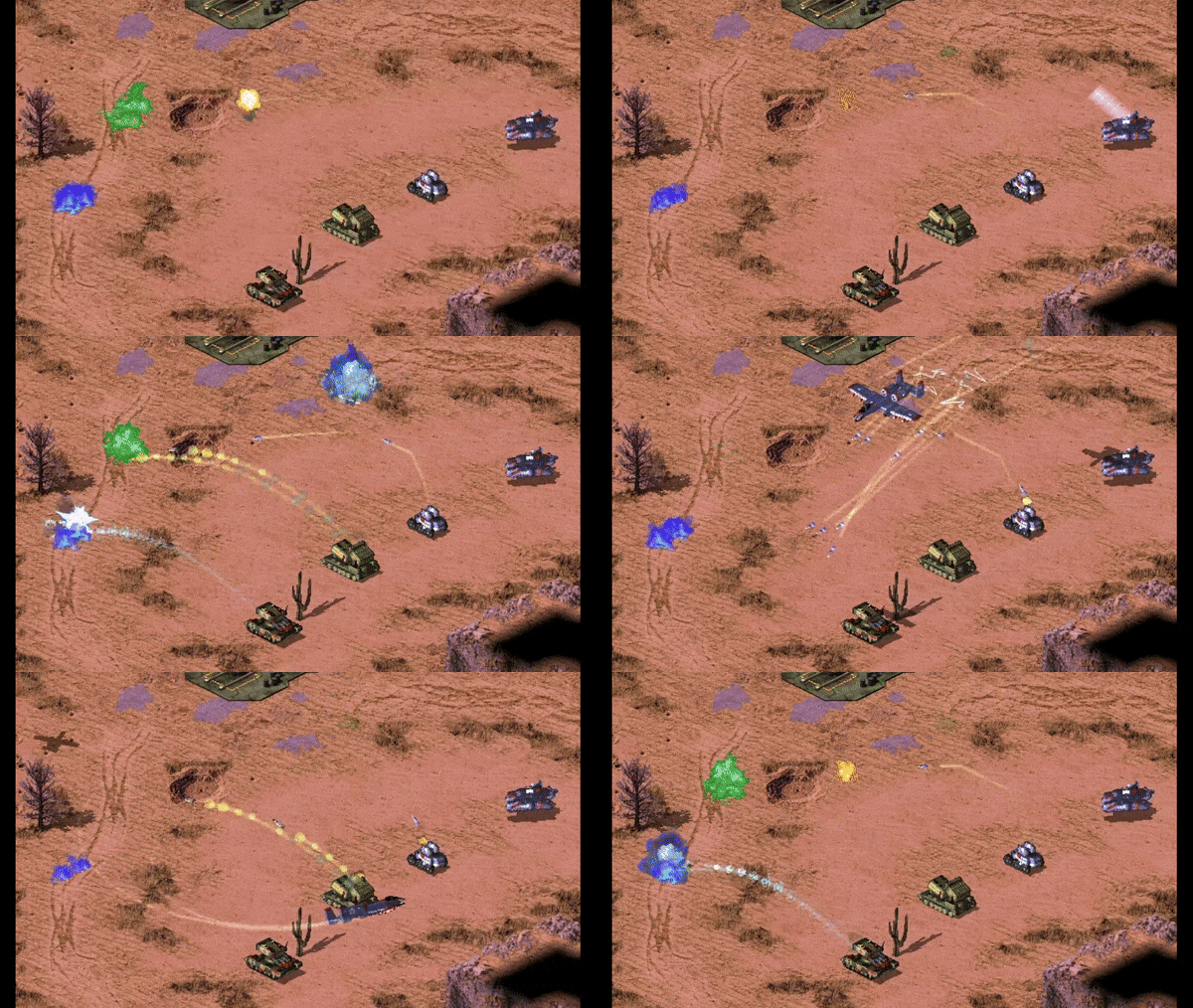 Laser trails used in Rise of the East
Technos, Projectiles, and VoxelAnims can now have colorful trails of different transparency, thickness and color, which are drawn via laser drawing code.
Technos, Projectiles, and VoxelAnims can have multiple laser trails. For technos each trail can have custom laser trail type and FLH offset relative to turret and body.
Warning
Laser trails are very resource intensive! Due to the game not utilizing GPU having a lot of trails can quickly drop the FPS on even good machines. To reduce that effect:
don’t put too many laser trails on units and projectiles;
make sure you set as high
SegmentLengthvalue as possible without trails being too jagged;try to keep the length of the trail minimal (can be achieved with smaller
FadeDurationdurations).
In artmd.ini:
[LaserTrailTypes]
0=SOMETRAIL

[SOMETRAIL]                   ; LaserTrailType name
IsHouseColor=false            ; boolean
Color=255,0,0                 ; integer - Red,Green,Blue
FadeDuration=64               ; integer
Thickness=4                   ; integer
SegmentLength=128             ; integer, minimal length of each trail segment
IgnoreVertical=false          ; boolean, whether the trail won't be drawn on vertical movement
IsIntense=false               ; boolean, whether the laser is "supported" (AKA prism forwarding)
CloakVisible=false            ; boolean, whether the laser is visible when the attached unit is cloaked

[SOMEPROJECTILE]              ; BulletType Image
LaserTrail.Types=SOMETRAIL    ; list of LaserTrailTypes

[SOMETECHNO]                  ; TechnoType Image
LaserTrailN.Type=SOMETRAIL    ; LaserTrailType
LaserTrailN.FLH=0,0,0         ; integer - Forward,Lateral,Height
LaserTrailN.IsOnTurret=false  ; boolean, whether the trail origin is turret
; where N = 0, 1, 2, ...
In rulesmd.ini:
[SOMEVOXELANIM]             ; VoxelAnim
LaserTrail.Types=SOMETRAIL  ; list of LaserTrailTypes
Shields
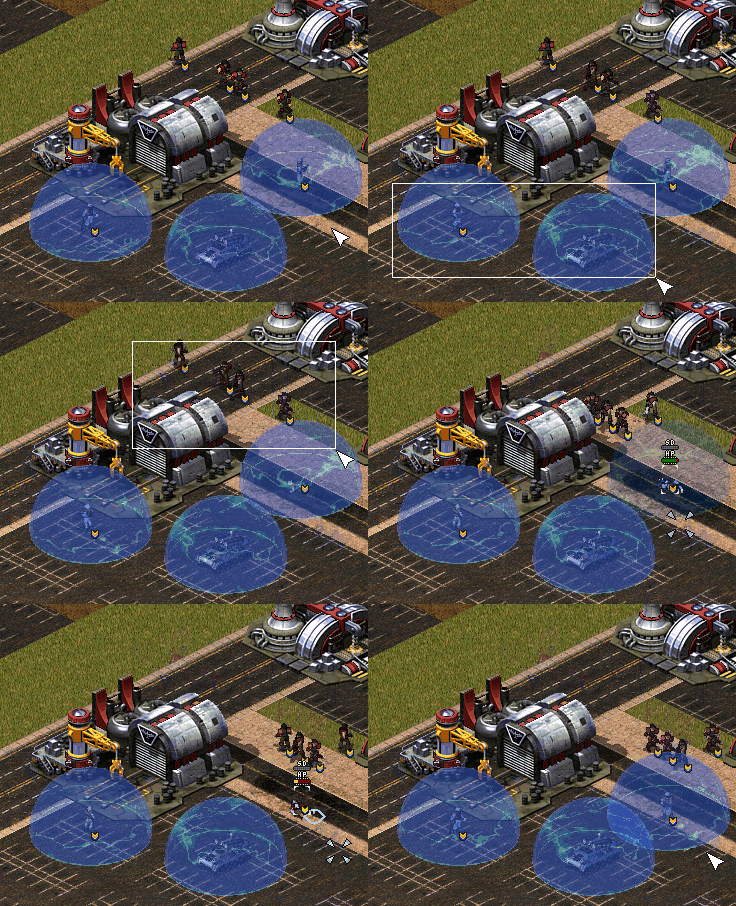 Buildings, Infantries and Vehicles with Shield in Fantasy ADVENTURE
In rulesmd.ini:
[AudioVisual]
Pips.Shield=-1,-1,-1               ; integer, frames of pips.shp (zero-based) for Green, Yellow, Red
Pips.Shield.Building=-1,-1,-1      ; integer, frames of pips.shp (zero-based) for Green, Yellow, Red
Pips.Shield.Background=PIPBRD.SHP  ; filename - including the .shp/.pcx extension
Pips.Shield.Building.Empty=0       ; integer, frame of pips.shp (zero-based) for empty building pip

[ShieldTypes]
0=SOMESHIELDTYPE

[SOMESHIELDTYPE]                     ; ShieldType name
Strength=0                           ; integer
InitialStrength=0                    ; integer
Armor=none                           ; ArmorType
Powered=false                        ; boolean
AbsorbOverDamage=false               ; boolean
SelfHealing=0.0                      ; double, percents or absolute
SelfHealing.Rate=0.0                 ; double, ingame minutes
Respawn=0.0                          ; double, percents or absolute
Respawn.Rate=0.0                     ; double, ingame minutes
BracketDelta=0                       ; integer - pixels
Pips=-1,-1,-1                        ; integer, frames of pips.shp (zero-based) for Green, Yellow, Red
Pips.Building=-1,-1,-1               ; integer, frames of pips.shp (zero-based) for Green, Yellow, Red
Pips.Background=                     ; filename - including the .shp/.pcx extension
Pips.Building.Empty=                 ; integer, frame of pips.shp (zero-based) for empty building pip
IdleAnim=                            ; Animation
IdleAnim.ConditionYellow=            ; Animation
IdleAnim.ConditionRed=               ; Animation
IdleAnimDamaged=                     ; Animation
IdleAnimDamaged.ConditionYellow=     ; Animation
IdleAnimDamaged.ConditionRed=        ; Animation
IdleAnim.OfflineAction=Hides         ; AttachedAnimFlag (None, Hides, Temporal, Paused or PausedTemporal)
IdleAnim.TemporalAction=Hides        ; AttachedAnimFlag (None, Hides, Temporal, Paused or PausedTemporal)
BreakAnim=                           ; Animation
HitAnim=                             ; Animation
BreakWeapon=                         ; WeaponType
AbsorbPercent=1.0                    ; floating point value
PassPercent=0.0                      ; floating point value
AllowTransfer=                       ; boolean
ImmuneToBerserk=no                   ; boolean

[SOMETECHNO]                         ; TechnoType
ShieldType=SOMESHIELDTYPE            ; ShieldType; none by default

[SOMEWARHEAD]                        ; WarheadType
Shield.Penetrate=false               ; boolean
Shield.Break=false                   ; boolean
Shield.BreakAnim=                    ; Animation
Shield.HitAnim=                      ; Animation
Shield.BreakWeapon=                  ; WeaponType
Shield.AbsorbPercent=                ; floating point value
Shield.PassPercent=                  ; floating point value
Shield.Respawn.Duration=0            ; integer, game frames
Shield.Respawn.Amount=0.0            ; floating point value, percents or absolute
Shield.Respawn.Rate=-1.0             ; floating point value, ingame minutes
Shield.Respawn.ResetTimer=false      ; boolean
Shield.SelfHealing.Duration=0        ; integer, game frames
Shield.SelfHealing.Amount=0.0        ; floating point value, percents or absolute
Shield.SelfHealing.Rate=-1.0         ; floating point value, ingame minutes
Shield.SelfHealing.ResetTimer=false  ; boolean
Shield.AffectTypes=                  ; List of ShieldType names
Shield.AttachTypes=                  ; List of ShieldType names
Shield.RemoveTypes=                  ; List of ShieldType names
Shield.ReplaceOnly=false             ; boolean
Shield.ReplaceNonRespawning=false    ; boolean
Shield.MinimumReplaceDelay=0         ; integer, game frames
Shield.InheritStateOnReplace=false   ; boolean
Now you can have a shield for any TechnoType. It serves as a second health pool with independent
ArmorandStrengthvalues.Negative damage will recover shield, unless shield has been broken. If shield isn’t full, all negative damage will be absorbed by shield.
Negative damage weapons will consider targets with active, but not at full health shields in need of healing / repairing unless the Warhead has
Shield.Penetrate=true, in which case only object health is considered.
When a TechnoType has an unbroken shield,
[ShieldType]->Armorwill replace[TechnoType]->Armorfor game calculation.InitialStrengthcan be used to set a different initial strength value from maximum.
When executing
DeploysIntoorUndeploysInto, if both of the TechnoTypes have shields, the transformed unit/building would keep relative shield health (in percents), same as withStrength. If one of the TechnoTypes doesn’t have shields, it’s shield’s state on conversion will be preserved until converted back.This also works with Ares’
Convert.*.
Poweredcontrols whether or not the shield is active when a unit is running low on power or it is affected by EMP.Attention, if TechnoType itself is not
Powered, then the shield won’t be offline when low power.
AbsorbOverDamagecontrols whether or not the shield absorbs damage dealt beyond shield’s current strength when the shield breaks.SelfHealingandRespawnrespect the following settings: 0.0 disables the feature, 1%-100% recovers/respawns the shield strength in percentage, other number recovers/respawns the shield strength directly. Specially,SelfHealingwith a negative number deducts the shield strength.If you want shield recovers/respawns 1 HP per time, currently you need to set tag value to any number between 1 and 2, like
1.1.
SelfHealing.RateandRespawn.Raterespect the following settings: 0.0 instantly recovers the shield, other values determine the frequency of shield recovers/respawns in ingame minutes.IdleAnim, if set, will be played while the shield is intact. This animation is automatically set to loop indefinitely.IdleAnim.ConditionYellowandIdleAnim.ConditionRedcan be used to set different animations for when shield health is at or below the percentage defined in[AudioVisual]->ConditionYellow/ConditionRed, respectively. IfIdleAnim.ConditionRedis not set it falls back toIdleAnim.ConditionYellow, which in turn falls back toIdleAnim.IdleAnimDamaged,IdleAnimDamaged.ConditionYellowandIdleAnimDamaged.ConditionRedare used in an identical manner, but only when health of the object the shield is attached to is at or below[AudioVisual]->ConditionYellow. Follows similar fallback sequence to regularIdleAnimvariants and if none are set, falls back to the regularIdleAnimor variants thereof.Bouncer=trueandIsMeteor=trueanimations can exhibit irregular behaviour when used asIdleAnimand should be avoided.
IdleAnim.OfflineActionindicates what happens to the animation when the shield is in a low power state.IdleAnim.TemporalActionindicates what happens to the animation when the shield is attacked by temporal weapons.BreakAnim, if set, will be played when the shield has been broken.HitAnim, if set, will be played when the shield is attacked, similar toWeaponNullifyAnimfor Iron Curtain.BreakWeapon, if set, will be fired at the TechnoType once the shield breaks.AbsorbPercentcontrols the percentage of damage that will be absorbed by the shield. Defaults to 1.0, meaning full damage absorption.PassPercentcontrols the percentage of damage that will not be absorbed by the shield, and will be dealt to the unit directly even if the shield is active. Defaults to 0.0 - no penetration.AllowTransfercontrols whether or not the shield can be transferred if the TechnoType changes (such as(Un)DeploysIntoor Ares type conversion). If not set, defaults to true if shield was attached viaShield.AttachTypes, otherwise false.ImmuneToBerserkgives the immunity againstPsychedelic=yeswarhead. Otherwise the berserk effect penetrates shields by default. Note that this shouldn’t prevent the unit from targeting at the shielded object.Versus.shieldArmor=0%is still required in this case.A TechnoType with a shield will show its shield Strength. An empty shield strength bar will be left after destroyed if it is respawnable. Several customizations are available for the shield strength pips.
By default, buildings use the 6th frame of
pips.shpto display the shield strength while others use the 17th frame.Pips.Shieldcan be used to specify which pip frame should be used as shield strength. If only 1 digit is set, then it will always display that frame, or if 3 digits are set, it will use those if shield’s current strength is at or belowConditionYellowandConditionRed, respectively.Pips.Shield.Buildingis used for BuildingTypes. -1 as value will use the default frame, whether it is fallback to first value or the aforementioned hardcoded defaults.Pips.Shield.Backgroundcan be used to set the background or ‘frame’ for non-building pips, which defaults topipbrd.shp. 4th frame is used to display an infantry’s shield strength and the 3th frame for other units, or 2nd and 1st respectively if not enough frames are available.Pips.Shield.Building.Emptycan be used to set the frame ofpips.shpdisplayed for empty building strength pips, defaults to 1st frame ofpips.shp.The above customizations are also available on per ShieldType basis, e.g
[ShieldType]->Pipsinstead of[AudioVisual]->Pips.Shieldand so on. ShieldType settings take precedence over the global ones, but will fall back to them if not set.BracketDeltacan be used as additional vertical offset (negative shifts it up) for shield strength bar. Much likePixelSelectionBracketDelta, it is not applied on buildings.
Warheads have new options that interact with shields.
Shield.Penetrateallows the warhead ignore the shield and always deal full damage to the TechnoType itself. It also allows targeting the TechnoType as if shield doesn’t exist.Shield.Breakallows the warhead to always break shields of TechnoTypes. This is done before damage is dealt.Shield.BreakAnimwill be displayed instead of ShieldTypeBreakAnimif the shield is broken by the Warhead, either through damage orShield.Break.Shield.HitAnimwill be displayed instead of ShieldTypeHitAnimif set when Warhead hits the shield.Shield.BreakWeaponwill be fired instead of ShieldTypeBreakWeaponif the shield is broken by the Warhead, either through damage orShield.Break.Shield.AbsorbPercentoverrides theAbsorbPercentvalue set in the ShieldType that is being damaged.Shield.PassPercentoverrides thePassPercentvalue set in the ShieldType that is being damaged.Shield.Respawn.Rate&Shield.Respawn.Amountoverride ShieldTypeRespawn.RateandRespawn.Amountfor duration ofShield.Respawn.Durationamount of frames. Negative rate & zero or lower amount default to ShieldType values. IfShield.Respawn.ResetTimeris set, currently running shield respawn timer is reset, otherwise the timer’s duration is adjusted to matchShield.Respawn.Ratewithout restarting the timer. If the effect expires while respawn timer is running, remaining time is adjusted to match ShieldTypeRespawn.Rate. Re-applying the effect resets the duration toShield.Respawn.DurationShield.SelfHealing.Rate&Shield.SelfHealing.Amountoverride ShieldTypeSelfHealing.RateandSelfHealing.Amountfor duration ofShield.SelfHealing.Durationamount of frames. Negative rate & zero or lower amount default to ShieldType values. IfShield.SelfHealing.ResetTimeris set, currently running self-healing timer is restarted, otherwise timer’s duration ‘is adjusted to matchShield.SelfHealing.Ratewithout restarting the timer. If the effect expires while self-healing timer is running, remaining time is adjusted to match ShieldTypeSelfHealing.Rate. Re-applying the effect resets the duration toShield.SelfHealing.Duration.Shield.AffectsTypesallows listing which ShieldTypes can be affected by any of the effects listed above. If none are listed, all ShieldTypes are affected.Shield.AttachTypes&Shield.RemoveTypesallows listing ShieldTypes that are attached or removed, respectively from any targets affected by the warhead (positiveVersesvalues). Normally only first listed ShieldType inShield.AttachTypesis applied.If
Shield.ReplaceOnlyis set, shields fromShield.AttachTypesare only applied to affected targets from which shields were simultaneously removed, matching the order listed inShield.RemoveTypes. IfShield.AttachTypescontains less items thanShield.RemoveTypes, last item from the former is used for any remaining removed shields.If
Shield.ReplaceNonRespawningis set, shield fromShield.AttachTypesreplaces existing shields that have been broken and cannot respawn on their own.Shield.MinimumReplaceDelaycan be used to control how long after the shield has been broken (in game frames) can it be replaced. If not enough frames have passed, it won’t be replaced.
If
Shield.InheritStateOnReplaceis set, shields replaced viaShield.ReplaceOnlyinherit the current strength (relative to ShieldTypeStrength) of the previous shield and whether or not the shield was currently broken. Self-healing and respawn timers are always reset.
Animations
Anim-to-Unit
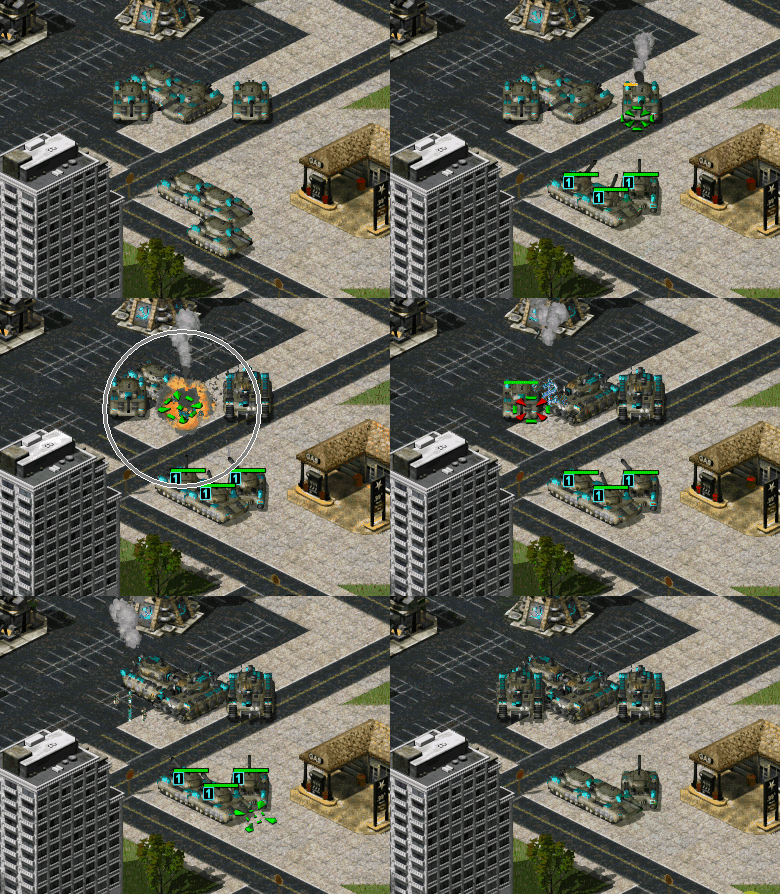
Animations can now create (or “convert” to) vehicles when they end via
CreateUnit.CreateUnit.Ownerdetermines which house will own the created VehicleType. This only works as expected if the animation has owner set.Vehicle destroy animations, animations from Warhead
AnimList/SplashListand map trigger action41 Play Anim Atwill have the owner set correctly.CreateUnit.RemapAnim, if set to true, will cause the animation to be drawn in unit palette and remappable to owner’s team color.
CreateUnit.Missiondetermines the initial mission of the created VehicleType.CreateUnit.Facingdetermines the initial facing of created VehicleType.CreateUnit.RandomFacing, if set to true makes it so that a random facing is picked instead.CreateUnit.InheritFacingsandCreateUnit.InheritTurretFacingsinherit facings for vehicle body and turret respectively from the destroyed vehicle if the animation is a vehicle destroy animation.
CreateUnit.ConsiderPathfinding, if set to true, will consider whether or not the cell where the animation is located is occupied by other objects or impassable to the vehicle being created and will attempt to find a nearby cell that is not. Otherwise the vehicle will be created at the animation’s location despite these obstacles.
In artmd.ini:
[SOMEANIM]                             ; AnimationType
CreateUnit=                            ; VehicleType
CreateUnit.Owner=Victim                ; Owner house kind, Invoker/Killer/Victim/Civilian/Special/Neutral/Random
CreateUnit.RemapAnim=false             ; boolean
CreateUnit.Mission=Guard               ; MissionType
CreateUnit.Facing=0                    ; integer, facings in range of 0-255
CreateUnit.RandomFacing=true           ; boolean
CreateUnit.InheritFacings=false        ; boolean
CreateUnit.InheritTurretFacings=false  ; boolean
CreateUnit.ConsiderPathfinding=false   ; boolean
Buildings
Extended building upgrades
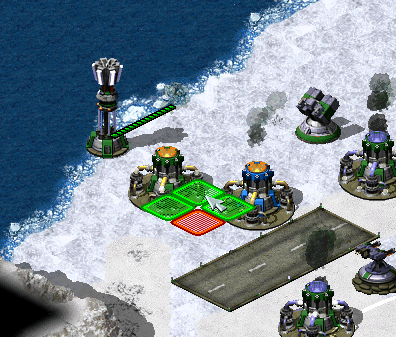 Upgrading own and allied Power Plants in CnC: Final War
Note
Due to technical limitations, with Ares, upgrades placed through PowersUp.Buildings instead of PowersUpBuilding (note that internally PowersUpBuilding is set to first entry of PowersUp.Buildings if former is not set but latter is) DO NOT satisfy prerequisites. Suggested workaround is to use the upgrades to provide Superweapons that spawn in buildings via LimboDelivery logic to function as prerequisites, which are destroyed by another SW that becomes available if parent building is gone and so on.
Building upgrades now can be placed on own buildings, on allied buildings and/or on enemy buildings. These three owners can be specified by
PowersUp.Owner. When upgrade is placed on building, it automatically changes it’s owner to match the building’s owner.One upgrade can now be applied to multiple different types of buildings specified by
PowersUp.Buildings.Ares-introduced build limit for building upgrades works with this feature.
In rulesmd.ini:
[UPGRADENAME]       ; BuildingType
PowersUp.Owner=Self ; list of Affected House Enumeration (none|owner/self|allies/ally|team|enemies/enemy|all)
PowersUp.Buildings= ; list of BuildingTypes
Power plant enhancer
When it exists, it can increase the power amount generated by the power plants.
When enchancing structures are sold or destroyed, the power amount returns to normal.
In rulesmd.ini:
[SOMEBUILDING]                     ; BuildingType
PowerPlantEnhancer.PowerPlants=    ; list of BuildingTypes
PowerPlantEnhancer.Amount=0        ; integer
PowerPlantEnhancer.Factor=1.0      ; floating point value
Infantry
Customizable FLH When Infantry Is Prone Or Deployed
Now infantry can override
PrimaryFireFLHandSecondaryFireFLHif is prone (crawling) or deployed. Also works in conjunction with burst-index specific firing offsets.
In artmd.ini:
[SOMEINFANTRY]             ; InfantryType
PronePrimaryFireFLH=       ; integer - Forward,Lateral,Height
ProneSecondaryFireFLH=     ; integer - Forward,Lateral,Height
DeployedPrimaryFireFLH=    ; integer - Forward,Lateral,Height
DeployedSecondaryFireFLH=  ; integer - Forward,Lateral,Height
Default disguise for individual InfantryTypes
Infantry can now have its
DefaultDisguiseoverridden per-type.This tag’s priority is higher than Ares’ per-side
DefaultDisguise.
In rulesmd.ini:
[SOMEINFANTRY]      ; InfantryType
DefaultDisguise=E2  ; InfantryType
Random death animaton for NotHuman Infantry
Infantry with
NotHuman=yescan now play random death anim sequence betweenDie1toDie5instead of the hardcodedDie1.Do not forget to tweak infantry anim sequences before enabling this feature, otherwise it will play invisible anim sequence.
In rulesmd.ini:
[SOMEINFANTRY]                    ; InfantryType
NotHuman.RandomDeathSequence=yes  ; boolean
Slaves’ house decision customization when owner is killed
You can now decide the slaves’ house when the corresponding slave miner is killed using
Slaved.OwnerWhenMasterKilled:suicide: Kill each slave if the slave miner is killed.master: Free the slaves but keep the house of the slave unchanged.neutral: The slaves belong to civilian house.killer: Free the slaves and give them to the house of the slave miner’s killer. (vanilla behavior)
In rulesmd.ini
[SOMEINFANTRY]                       ; Slave type
Slaved=yes
Slaved.OwnerWhenMasterKilled=killer  ; enumeration (suicide | master | killer | neutral)
Projectiles
Projectile interception logic
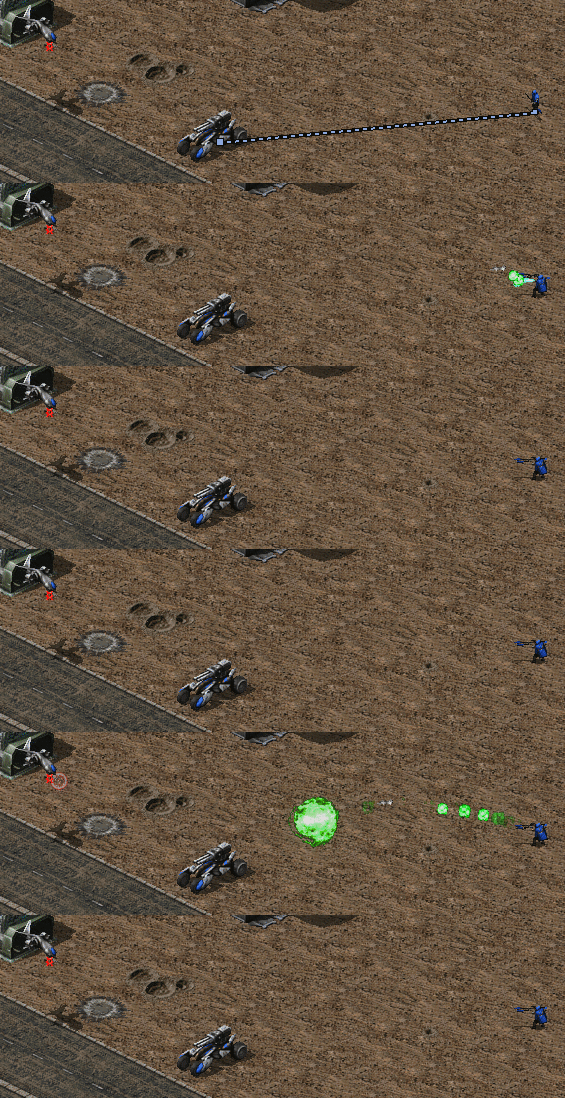 Interception logic used in Tiberium Crisis mod
Projectiles can now be made interceptable by certain TechnoTypes by setting
Interceptable=trueon them. The TechnoType scans for interceptable projectiles within a range if it has no other target and will use one of its weapons to shoot at them. Projectiles can defineArmorandStrength. Weapons that cannot target the projectile’s armor type will not attempt to intercept it. On interception, if the projectile hasArmorset, an amount equaling to the intercepting weapon’sDamageadjusted by WarheadVersesand the TechnoType’s firepower multipliers is deducted from the projectile’s current strength. Regardless of if the current projectile strength was reduced or not, if it sits at 0 or below after interception, the projectile is detonated.Interceptor.Weapondetermines the weapon (0 =Primary, 1 =Secondary) to be used for intercepting projectiles.The interceptor weapon may need
AGand/orAAset to true on its projectile to be able to target projectiles depending on their elevation from ground. If you don’t set those then the weapon won’t be able to target low-flying or high-flying projectiles respectively.
Interceptor.CanTargetHousescontrols which houses the projectiles (or rather their firers) can belong to be eligible for interception.Interceptor.GuardRange(andInterceptor.(Rookie|Veteran|EliteGuardRange) is maximum range of the unit to intercept projectile. The unit weapon range will limit the unit interception range though.Interceptor.MinimumGuardRange(andInterceptor.(Rookie|Veteran|EliteMinimumGuardRange) is the minimum range of the unit to intercept projectile. Any projectile under this range will not be intercepted.Interceptable.DeleteOnInterceptdetermines whether or not the projectile will simply be deleted on detonation upon interception, or if it will properly detonate. Will be overridden byInterceptor.DeleteOnInterceptsetting on the interceptor.Interceptable.WeaponOverridecan be set to a WeaponType that will be used to override characteristics such asDamageandWarheadof the current projectile for detonation after interception. Will be overridden byInterceptor.WeaponOverridesetting on the interceptor.On interceptors,
Interceptor.WeaponReplaceProjectilecan be set to true to makeInterceptor.WeaponOverridealso replace the intercepted projectile’s type (includingImageand other projectile characteristics) andSpeedwith its own. Does not replace particle systems (AttachedSystem, Ares feature).On interceptors,
Interceptor.WeaponCumulativeDamagecan be set to true to makeDamagefromInterceptor.WeaponOverrideweapon be added on the projectile’s damage rather than override it.
Interceptor.KeepIntactcan be set to true to allow intercepted projectiles to continue traveling as if they were not intercepted, but effects such asInterceptor.WeaponOverridewill still be applied.
In rulesmd.ini:
[SOMETECHNO]                               ; TechnoType
Interceptor=false                          ; boolean
Interceptor.Weapon=0                       ; integer, weapon slot index (0 or 1)
Interceptor.CanTargetHouses=enemies        ; Affected House Enumeration (none|owner/self|allies/ally|team|enemies/enemy|all)
Interceptor.GuardRange=0.0                 ; floating point value
Interceptor.VeteranGuardRange=             ; floating point value
Interceptor.EliteGuardRange=               ; floating point value
Interceptor.MinimumGuardRange=0.0          ; floating point value
Interceptor.VeteranMinimumGuardRange=      ; floating point value
Interceptor.EliteMinimumGuardRange=        ; floating point value
Interceptor.DeleteOnIntercept=false        ; boolean
Interceptor.WeaponOverride=                ; WeaponType
Interceptor.WeaponReplaceProjectile=false  ; boolean
Interceptor.WeaponCumulativeDamage=false   ; boolean
Interceptor.KeepIntact=false               ; boolean

[SOMEPROJECTILE] ; Projectile
Interceptable=false                    ; boolean
Interceptable.DeleteOnIntercept=false  ; boolean
Interceptable.WeaponOverride=          ; WeaponType
Strength=0                             ; integer
Armor=                                 ; ArmorType
Projectile trajectories
Projectiles can now have customizable trajectories.
Trajectoryshould not be combined with original game’s projectile trajectory logics (Arcing,ROTorInviso).Initial speed of the projectile is defined by
Trajectory.Speed, which unlikeSpeedused byROT> 0 projectiles is defined on projectile not weapon.
In
rulesmd.ini:
[SOMEPROJECTILE]        ; Projectile
Trajectory.Speed=100.0  ; floating point value
Straight trajectory
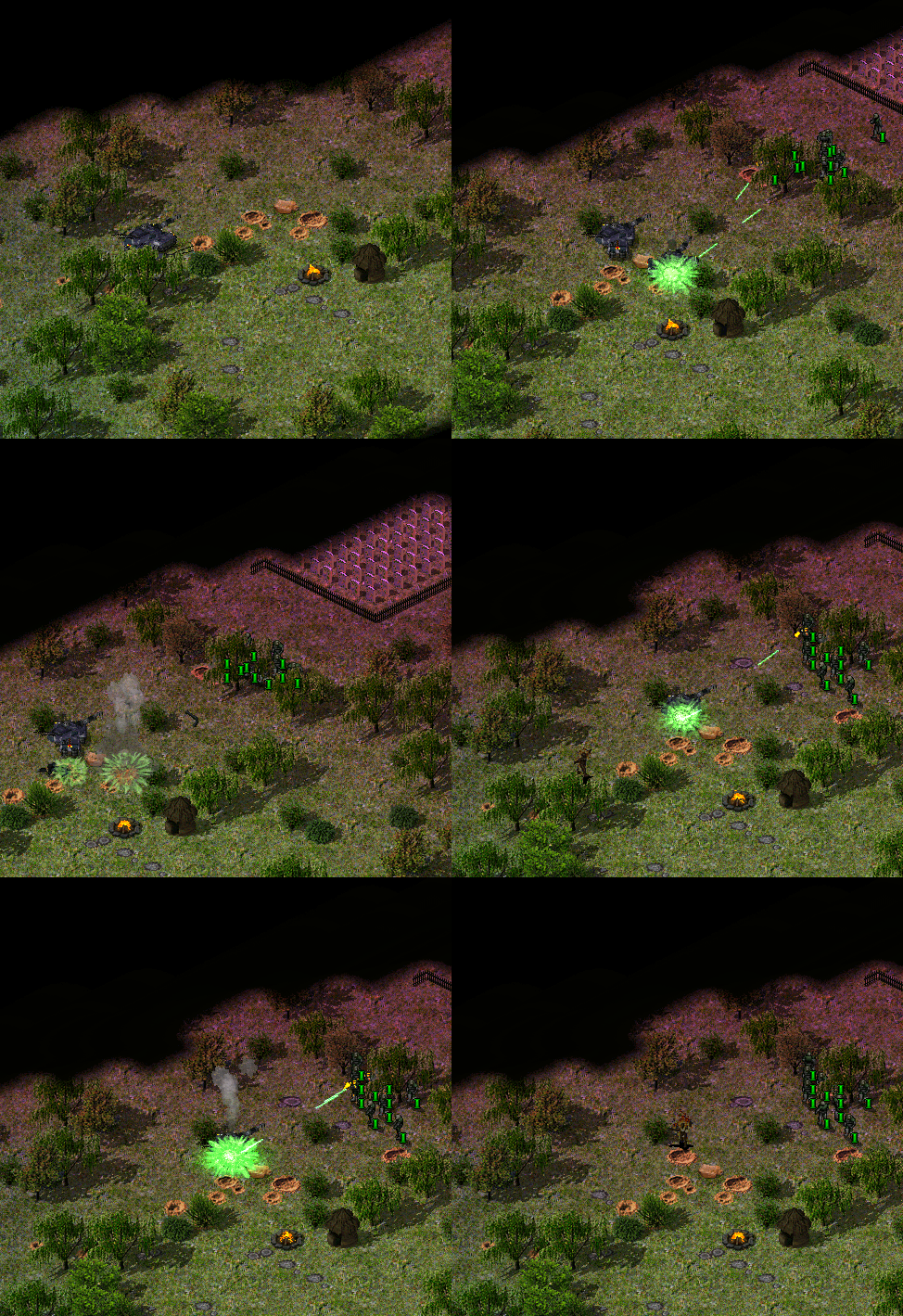 Straight trajectory used to make blasters in a private mod by @brsajo#9745
Self-explanatory, is a straight-shot trajectory.
In rulesmd.ini:
[SOMEPROJECTILE]     ; Projectile
Trajectory=Straight  ; Trajectory type
Bombard trajectory
Similar trajectory to
Straight, but targets a coordinate above the intended target (height determined byTrajectory.Bombard.Height). When the projectile approaches that coordinate, it will free fall and explodes when it hits the target or ground.
In rulesmd.ini:
[SOMEPROJECTILE]               ; Projectile
Trajectory=Bombard             ; Trajectory type
Trajectory.Bombard.Height=0.0  ; double
Shrapnel enhancement
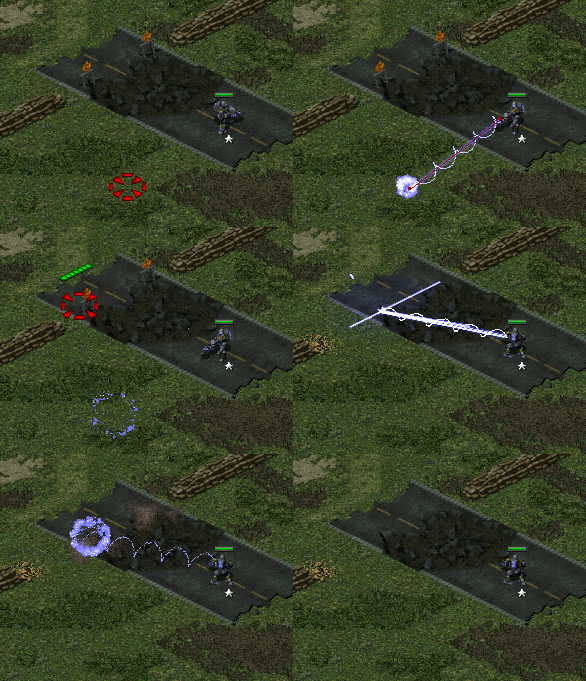 Shrapnel appearing against ground & buildings (Project Phantom)
Shrapnel behavior can be triggered on the ground and buildings.
In rulesmd.ini:
[SOMEPROJECTILE]                 ; Projectile
Shrapnel.AffectsGround=false     ; boolean
Shrapnel.AffectsBuildings=false  ; boolean
Super Weapons
LimboDelivery
Super Weapons can now deliver off-map buildings that act as if they were on the field.
LimboDelivery.Typesis the list of BuildingTypes that will be created when the Super Weapons fire. Super Weapon Type and coordinates do not matter.LimboDelivery.IDsis the list of numeric IDs that will be assigned to buildings. Necessary for LimboKill to work.
Created buildings are not affected by any on-map threats. The only way to remove them from the game is by using a Super Weapon with LimboKill set.
LimboKill.Affectssets which houses are affected by this feature.LimboKill.IDslists IDs that will be targeted. Buildings with these IDs will be removed from the game instantly.
Delivery can be made random with these optional tags. The game will randomly choose only a single building from the list for each roll chance provided.
LimboDelivery.RollChancelits chances of each “dice roll” happening. Valid values range from 0% (never happens) to 100% (always happens). Defaults to a single sure roll.LimboDelivery.RandomWeightsNlists the weights for each “dice roll” that increase the probability of picking a specific building. Valid values are 0 (don’t pick) and above (the higher value, the bigger the likelyhood).RandomWeightsare a valid alias forRandomWeights0. If a roll attempt doesn’t have weights specified, the last weights will be used.
Note: This feature might not support every building flag. Flags that are confirmed to work correctly are listed below:
FactoryPlant
OrePurifier
SpySat
KeepAlive (Ares 3.0)
Prerequisite, PrerequisiteOverride, Prerequisite.List# (Ares 0.1), Prerequisite.Negative (Ares 0.1), GenericPrerequisites (Ares 0.1)
SuperWeapon, SuperWeapon2, SuperWeapons (Ares 0.9), SW.AuxBuildings (Ares 0.9), SW.NegBuildings (Ares 0.9)
Note: In order for this feature to work with AITriggerTypes conditions (“Owning house owns ???” and “Enemy house owns ???”), LegalTarget must be set to true.
Warning
Remember that Limbo Delivered buildings don’t exist physically! This means they should never have enabled machanics that require interaction with the game world (i.e. factories, cloning vats, service depots, helipads). They also should have either KeepAlive=no set or be killable with LimboKill - otherwise the game might never end.
In rulesmd.ini:
[SOMESW]                        ; Super Weapon
LimboDelivery.Types=            ; List of BuildingTypes
LimboDelivery.IDs=              ; List of numeric IDs. -1 cannot be used.
LimboDelivery.RollChances=      ; List of percentages.
LimboDelivery.RandomWeightsN=   ; List of integers.
LimboKill.Affects=self          ; Affected House Enumeration (none|owner/self|allies/ally|team|enemies/enemy|all)
LimboKill.IDs=                  ; List of numeric IDs.
Technos
Automatic passenger deletion
Transports with these tags will erase the passengers overtime. Bigger units takes more time. Optionally this logic can work like a grinder.
Good combination with Ares Abductor logic.
In rulesmd.ini:
[SOMETECHNO]                               ; TechnoType
PassengerDeletion.Rate=0                   ; integer, game frames
PassengerDeletion.Rate.SizeMultiply=true   ; boolean, whether to multiply frames amount by size
PassengerDeletion.Soylent=no               ; boolean
PassengerDeletion.SoylentFriendlies=false  ; boolean
PassengerDeletion.ReportSound=             ; Sound
PassengerDeletion.Anim=                    ; Animation
Automatic passenger owner change to match transport owner
Transports with
Passengers.SyncOwnerset to true will have the owner of their passengers changed to match the transport if transport’s owner changes.On
OpenTopped=truetransports this will also disable checks that prevent target acquisition by passengers when the transport is temporarily mind controlled.Passengers.SyncOwner.RevertOnExit, if set to true (which is the default), changes the passengers’ owner back to whatever it was originally when they entered the transport when they are ejected.Does not work on passengers acquired through use of
Abductor=trueweapon (Ares feature).
In rulesmd.ini:
[SOMETECHNO]                            ; TechnoType
Passengers.SyncOwner=false              ; boolean
Passengers.SyncOwner.RevertOnExit=true  ; boolean
Automatically firing weapons
You can now make TechnoType automatically fire its weapon(s) without having to scan for suitable targets by setting
AutoFire, on either its base cell (in which case the weapon that is used for force-firing is used) or itself (in which case normal targeting and weapon selection rules and are respected) depending on ifAutoFire.TargetSelfis set or not.
In rulesmd.ini:
[SOMETECHNO]               ; TechnoType
AutoFire=false             ; boolean
AutoFire.TargetSelf=false  ; boolean
Customizable OpenTopped properties
You can now override global
OpenToppedtransport properties per TechnoType.OpenTopped.IgnoreRangefindingcan be used to disableOpenToppedtransport rangefinding behaviour where smallest weapon range between transport and all passengers is used when approaching targets that are out of range and when scanning for potential targets.OpenTopped.AllowFiringIfDeactivatedcan be used to customize whether or not passengers can fire out when the transport is deactivated (EMP, powered unit etc).
[SOMETECHNO]                              ; TechnoType
OpenTopped.RangeBonus=                    ; integer, override of the global default
OpenTopped.DamageMultiplier=              ; floating point value, override of the global default
OpenTopped.WarpDistance=                  ; integer, override of the global default
OpenTopped.IgnoreRangefinding=false       ; boolean
OpenTopped.AllowFiringIfDeactivated=true  ; boolean
Disabling fallback to (Elite)Secondary weapon
It is now possible to disable the fallback to
(Elite)Secondaryweapon from(Elite)Primaryweapon if it cannot fire at the chosen target by settingNoSecondaryWeaponFallbackto true (defaults to false). This does not apply to special cases where(Elite)Secondaryweapon is always chosen, including but not necessarily limited to the following:OpenTransportWeapon=1on an unit firing from insideOpenTopped=truetransport.NoAmmoWeapon=1on an unit withAmmovalue higher than 0 and current ammo count lower or equal toNoAmmoAmount.Deployed
IsSimpleDeployer=trueunits withDeployFireWeapon=1set or omitted.DrainWeapon=trueweapons against enemyDrainable=yesbuildings.Units with
IsLocomotor=trueset onWarheadof(Elite)Primaryweapon against buildings.Weapons with
ElectricAssault=trueset onWarheadagainstOverpowerable=truebuildings belonging to owner or allies.Overpowerable=truebuildings that are currently overpowered.Any system using
(Elite)WeaponX, f.exGunner=trueorIsGattling=trueis also wholly exempt.
In rulesmd.ini:
[SOMETECHNO]                     ; TechnoType
NoSecondaryWeaponFallback=false  ; boolean
Firing offsets for specific Burst shots
You can now specify separate firing offsets for each of the shots fired by weapon with
Burstvia using(Elite)(Prone/Deployed)PrimaryFire|SecondaryFire|WeaponX|FLH.BurstNkeys, depending on which weapons your TechnoType makes use of. N inBurstNis zero-based burst shot index, and the values are parsed sequentially until no value for either regular or elite weapon is present, with elite weapon defaulting to regular weapon FLH if only it is missing. If no burst-index specific value is available, value from the base key (f.exPrimaryFireFLH) is used.Burst-index specific firing offsets are absolute firing offsets and the lateral shifting based on burst index that occurs with the base firing offsets is not applied.
In artmd.ini:
[SOMETECHNO]    ; TechnoType Image
FLHKEY.BurstN=  ; integer - Forward,Lateral,Height. FLHKey refers to weapon-specific FLH key name and N is zero-based burst shot index.
Initial Strength
You can now specify how many hitpoints a TechnoType starts with.
In rulesmd.ini:
[SOMETECHNO]      ; TechnoType
InitialStrength=  ; integer
Initial Strength For Cloned Infantry
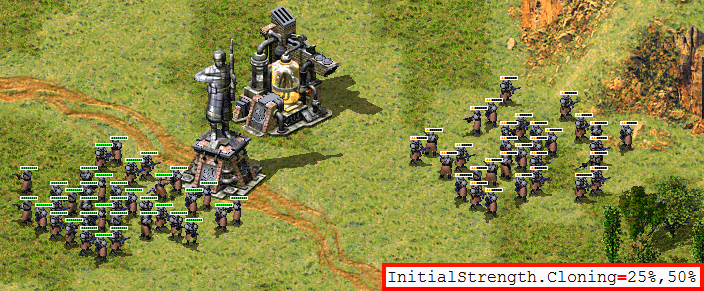 Initial strength for cloned infantry example in C&C: Reloaded
You can now specify how many hitpoints an Infantry Type starts with when leaves a Cloning Structure with
Cloning=yes.
In rulesmd.ini:
[SOMEBUILDING]            ; BuildingType
InitialStrength.Cloning=  ; single double/percentage or comma-sep. range
Note
Both InitialStrength and InitialStrength.Cloning never surpass the type’s Strength, even if your values are bigger than it.
Kill Object Automatically
Objects can be destroyed automatically if any of these conditions is met:
OnAmmoDepletion: The object will die if the remaining ammo reaches 0.AfterDelay: The object will die if the countdown (in frames) reaches 0.
The auto-death behavior can be chosen from the following:
kill: The object will be destroyed normally.vanish: The object will be directly removed from the game peacefully instead of actually getting killed.sell: If the object is a building with buildup, it will be sold instead of destroyed.
If this option is not set, the self-destruction logic will not be enabled.
Note
Please notice that if the object is a unit which carries passengers, they will not be released even with the kill option. This might change in the future if necessary.
If the object enters transport, the countdown will continue, but it will not self-destruct inside the transport.
In rulesmd.ini:
[SOMETECHNO]                  ; TechnoType
AutoDeath.Behavior=           ; enumeration (kill | vanish | sell), default not set

AutoDeath.OnAmmoDepletion=no  ; boolean
AutoDeath.AfterDelay=0        ; positive integer
Mind Control enhancement
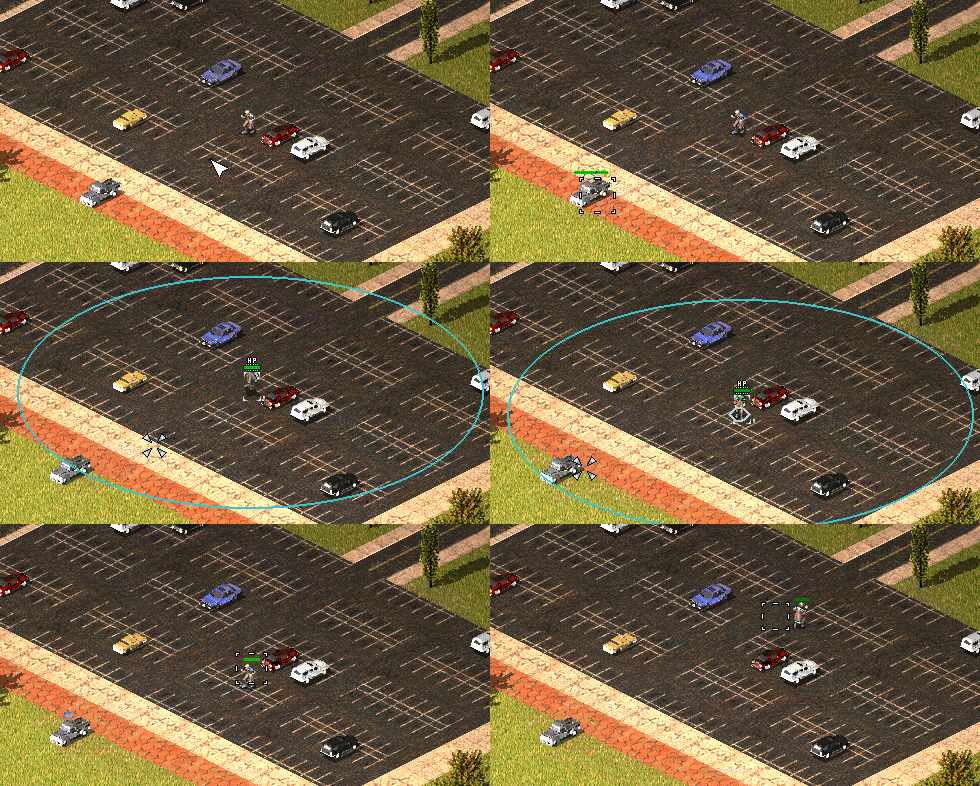 Mind Control Range Limit used in Fantasy ADVENTURE
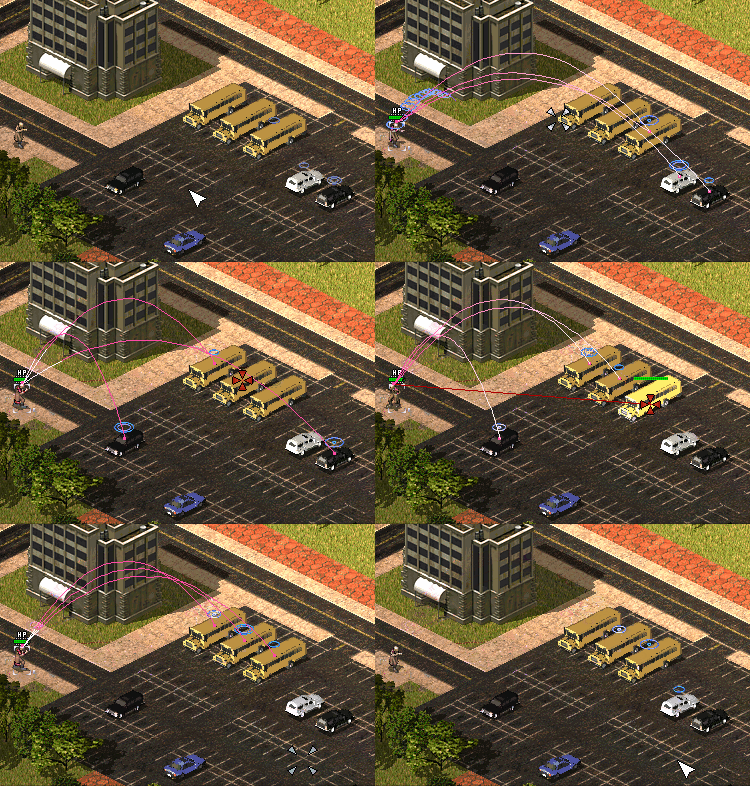 Multiple Mind Control unit auto-releases the first victim in Fantasy ADVENTURE
Mind controllers now can have the upper limit of the control distance. Tag values greater than 0 will activate this feature.
Mind controllers with multiple controlling slots can now release the first controlled unit when they have reached the control limit and are ordered to control a new target.
Allows Warheads to play custom
MindControl.Animwhich defaults toControlledAnimationType.
In rulesmd.ini:
[SOMETECHNO]                          ; TechnoType
MindControlRangeLimit=-1.0            ; floating point value
MultiMindControl.ReleaseVictim=false  ; boolean

[SOMEWARHEAD]                         ; Warhead
MindControl.Anim=                     ; Animation, defaults to ControlledAnimationType
No Manual Move
You can now specify whether a TechnoType is unable to receive move command.
[SOMETECHNO]        ; TechnoType
NoManualMove=false  ; boolean
Override Uncloaked Underwater attack behavior
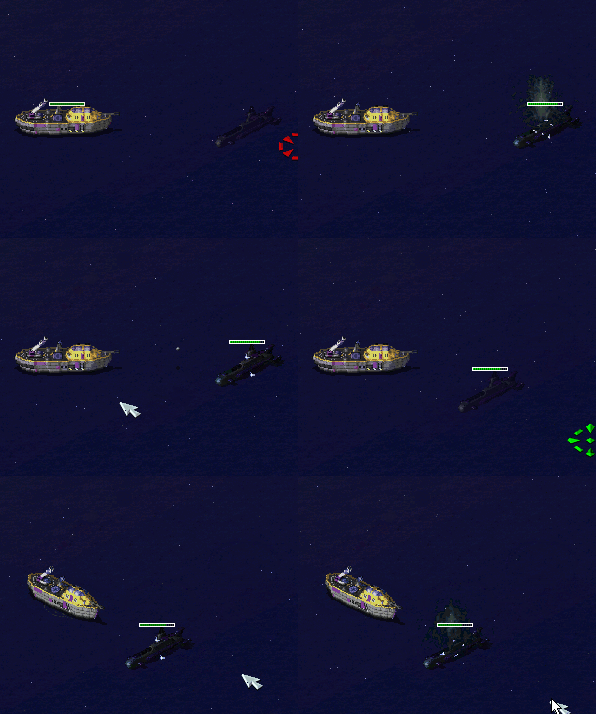 Naval underwater behavior in C&C: Reloaded
Overrides a part of the vanilla YR logic for allowing naval units to use a different weapon if the naval unit is uncloaked.
Useful if your naval unit have 1 weapon only for underwater and another weapon for surface objects.
In rulesmd.ini:
[SOMETECHNO]                    ; TechnoType
ForceWeapon.Naval.Decloaked=-1  ; integer. 0 for primary weapon, 1 for secondary weapon, -1 to disable
Promoted Spawns
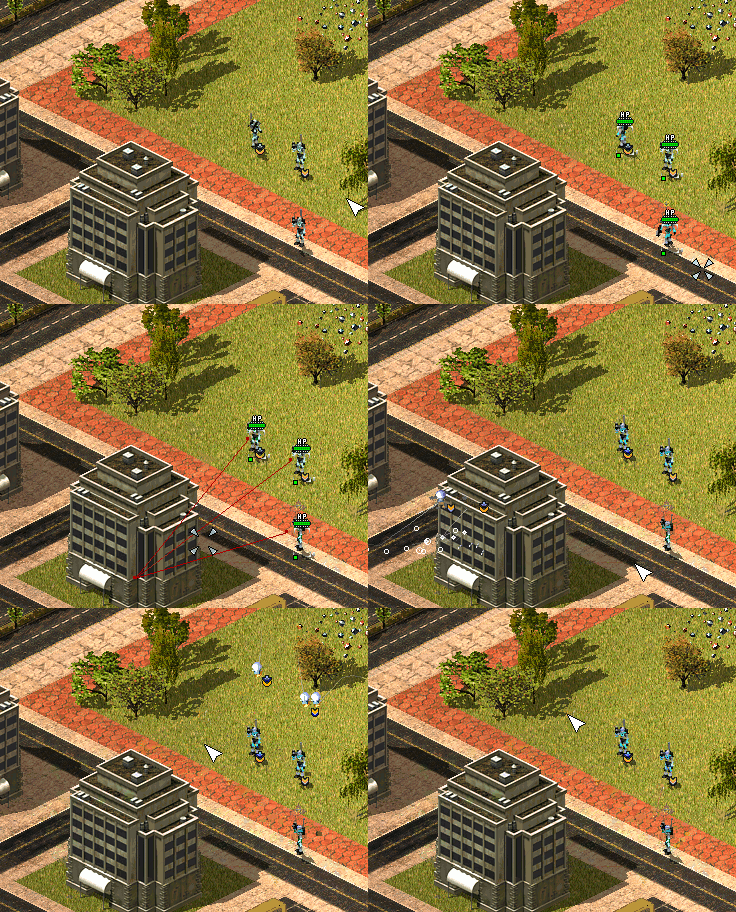 Promoted Spawns in Fantasy ADVENTURE
The spawned units will promote as their owner’s veterancy.
In rulesmd.ini:
[SOMETECHNO]                 ; TechnoType
Promote.IncludeSpawns=false  ; boolean
Spawn range limit
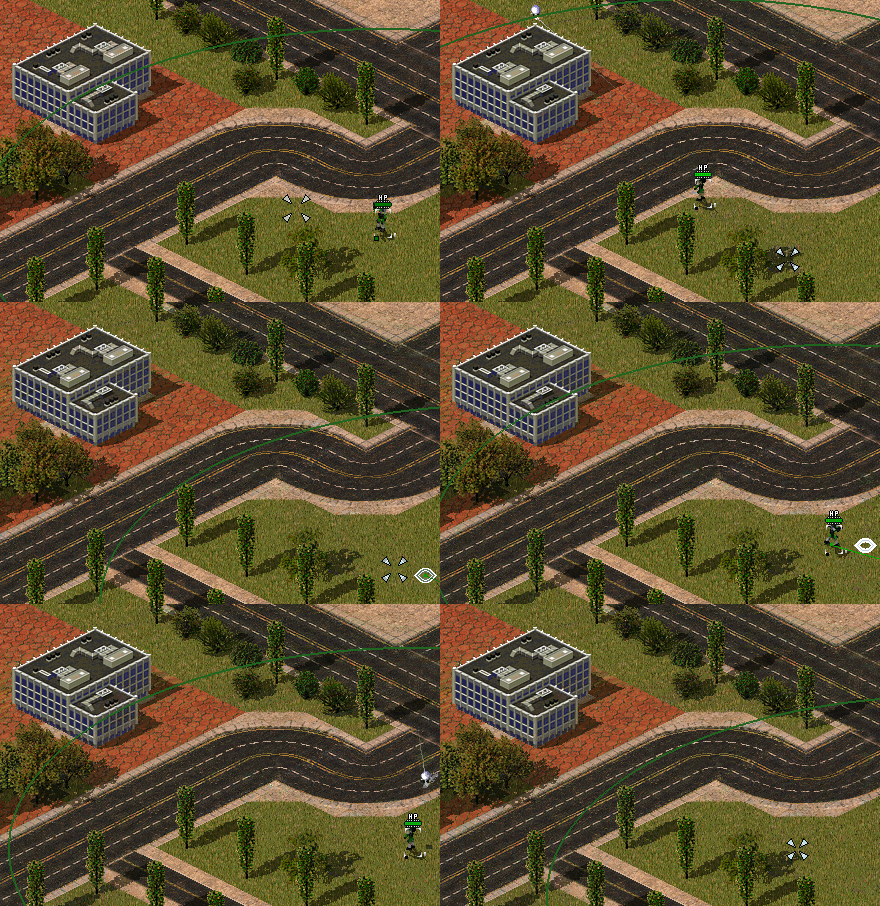 Limited pursue range for spawns in Fantasy ADVENTURE
The spawned units will abort the infinite pursuit if the enemy is out of range.
Spawner.ExtraLimitRangeadds extra pursuit range to the spawned units.
In rulesmd.ini:
[SOMETECHNO]               ; TechnoType
Spawner.LimitRange=false   ; boolean
Spawner.ExtraLimitRange=0  ; integer
Weapons fired on warping in / out
It is now possible to add weapons that are fired on a teleporting TechnoType when it warps in or out. They are at the same time as the appropriate animations (
WarpIn/WarpOut) are displayed.WarpInMinRangeWeaponis used instead ofWarpInWeaponif the distance traveled (in leptons) was less thanChronoRangeMinimum. This works regardless of ifChronoTriggeris set or not. IfWarpInMinRangeWeaponis not set, it defaults toWarpInWeapon.If
WarpInWeapon.UseDistanceAsDamageis set,DamageofWarpIn(MinRange)Weaponis overriden by the number of whole cells teleported across.
In rulesmd.ini:
[SOMETECHNO]                            ; TechnoType
WarpInWeapon=                           ; WeaponType
WarpInMinRangeWeapon=                   ; WeaponType
WarpInWeapon.UseDistanceAsDamage=false  ; boolean
WarpOutWeapon=                          ; WeaponType
Customize EVA voice and SellSound when selling units
When a building or a unit is sold, a sell sound as well as an EVA is played to the owner. These configurations have been deglobalized.
EVA.Soldis used to customize the EVA voice when selling, default toEVA_StructureSoldfor buildings andEVA_UnitSoldfor vehicles.SellSoundis used to customize the report sound when selling, default to[AudioVisual]->SellSound. Note that vanilla game played vehicles’ SellSound globally. This has been changed in consistency with buildings’ SellSound.
In rulesmd.ini:
[SOMETECHNO]    ; BuildingType or UnitType
EVA.Sold=       ; EVA entry
SellSound=      ; sound entry
Terrain
Destroy animation & sound
You can now specify a destroy animation and sound for a TerrainType that are played when it is destroyed.
In rulesmd.ini:
[SOMETERRAINTYPE]  ; TerrainType
DestroyAnim=       ; Animation
DestroySound=      ; Sound
Warheads
Hint
All new warheads can be used with CellSpread and Ares’ GenericWarhead superweapon where applicable.
Break Mind Control on impact
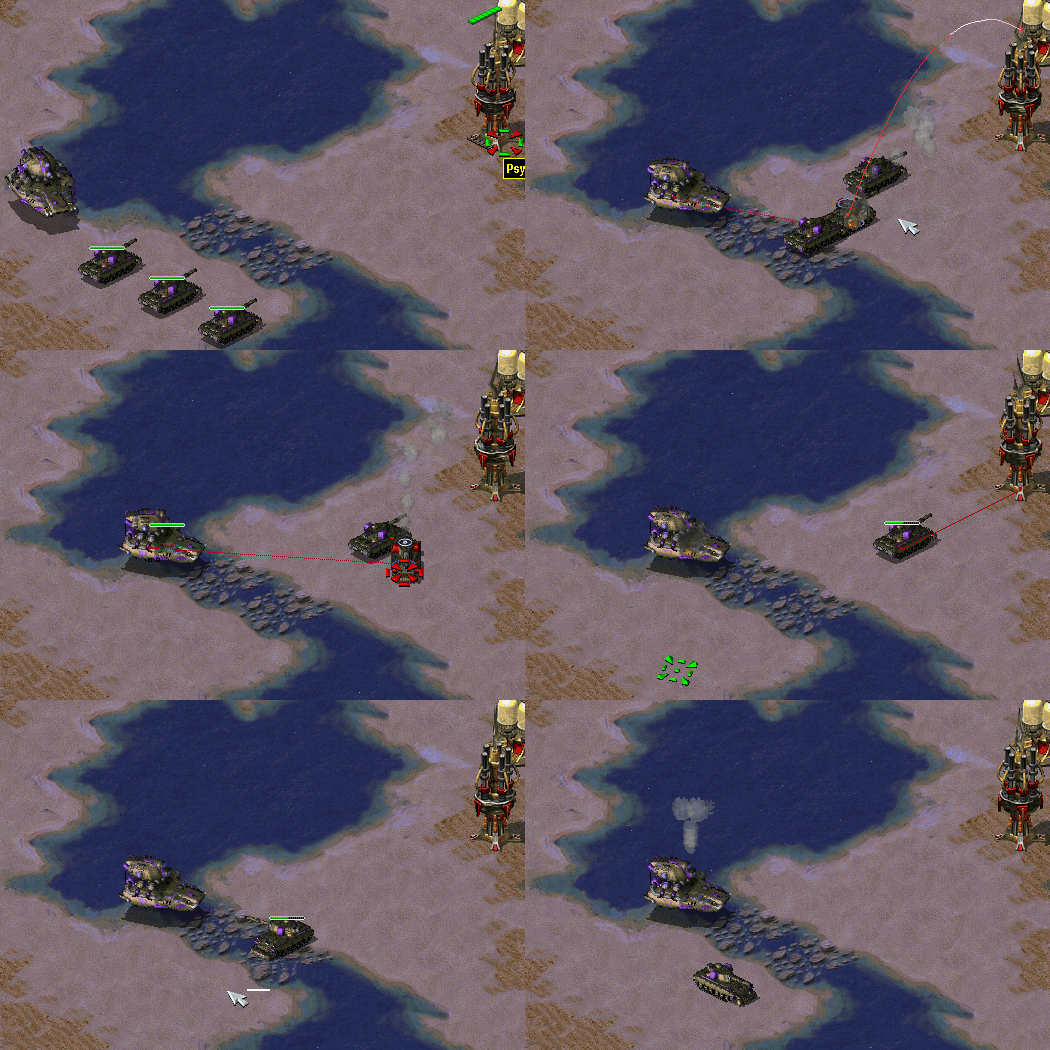 Mind control break warhead being utilized (RA2: Reboot)
Warheads can now break mind control (doesn’t apply to perma-MC-ed objects).
In rulesmd.ini:
[SOMEWARHEAD]            ; Warhead
RemoveMindControl=false  ; boolean
Chance-based extra damage or Warhead detonation / ‘critical hits’
Warheads can now apply additional chance-based damage or Warhead detonation (‘critical hits’) with the ability to customize chance, damage, affected targets, affected target HP threshold and animations of critical hit.
Crit.Chancedetermines chance for a critical hit to occur. By default this is checked once when the Warhead is detonated and every target that is susceptible to critical hits will be affected. IfCrit.ApplyChancePerTargetis set, then whether or not the chance roll is successful is determined individually for each target.Crit.ExtraDamagedetermines the damage dealt by the critical hit. IfCrit.Warheadis set, the damage is used to detonate the specified Warhead on each affected target, otherwise the damage is directly dealt based on current Warhead’sVersessettings.Crit.Affectscan be used to customize types of targets that this Warhead can deal critical hits against.Crit.AffectsBelowPercentcan be used to set minimum percentage of their maximumStrengththat targets must have left to be affected by a critical hit.Crit.AnimListcan be used to set a list of animations used instead of Warhead’sAnimListif Warhead deals a critical hit to even one target. IfCrit.AnimList.PickRandomis set (defaults toAnimList.PickRandom) then the animation is chosen randomly from the list.Crit.AnimOnAffectedTargets, if set, makes the animation(s) fromCrit.AnimListplay on each affected target in addition to animation from Warhead’sAnimListplaying as normal instead of replacingAnimListanimation.
Crit.SuppressWhenIntercepted, if set, prevents critical hits from occuring at all if the warhead was detonated from a projectile that was intercepted.ImmuneToCritcan be set on TechnoTypes to make them immune to critical hits.
In rulesmd.ini:
[SOMEWARHEAD]                       ; Warhead
Crit.Chance=0.0                     ; floating point value, percents or absolute (0.0-1.0)
Crit.ApplyChancePerTarget=false     ; boolean
Crit.ExtraDamage=0                  ; integer
Crit.Warhead=                       ; Warhead
Crit.Affects=all                    ; list of Affected Target Enumeration (none|land|water|empty|infantry|units|buildings|all)
Crit.AffectBelowPercent=1.0         ; floating point value, percents or absolute (0.0-1.0)
Crit.AnimList=                      ; list of animations
Crit.AnimList.PickRandom=           ; boolean
Crit.AnimOnAffectedTargets=false    ; boolean
Crit.SuppressWhenIntercepted=false  ; boolean

[SOMETECHNO]                        ; TechnoType
ImmuneToCrit=no                     ; boolean
Warning
If you set Crit.Warhead to the same Warhead it is defined on, or create a chain of Warheads with it that loops back to the first one there is a possibility for the game to get stuck in a loop and freeze or crash afterwards.
Custom ‘SplashList’ on Warheads
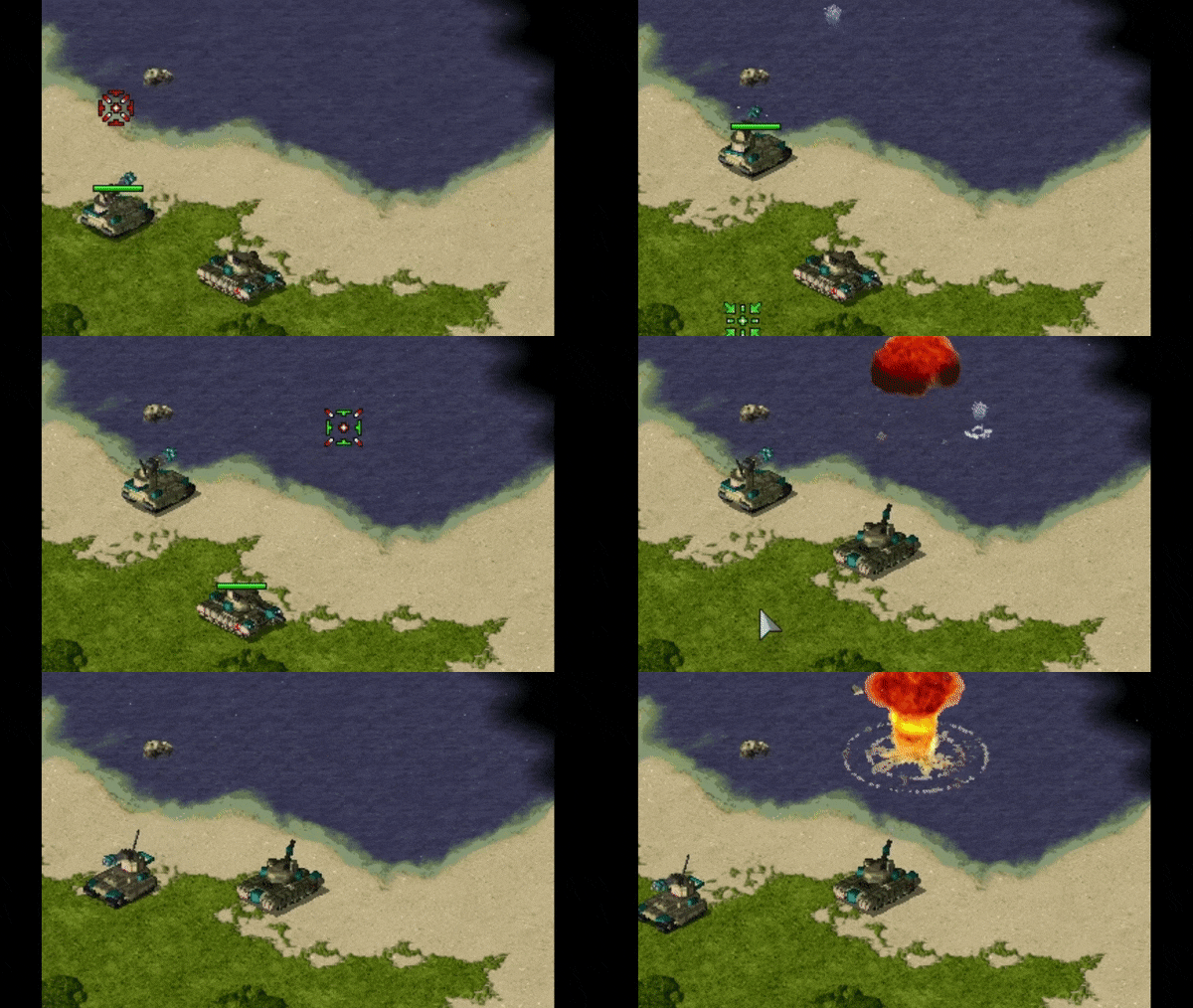
Allows Warheads to play custom water splash animations. See vanilla’s Conventional system here.
SplashList.PickRandomcan be set to true to pick a random animation to play from the list.
In rulesmd.ini:
[SOMEWARHEAD]                ; Warhead
SplashList=<none>            ; list of animations
SplashList.PickRandom=false  ; boolean
Detonate Warhead on all objects on map
Warning
While this feature can provide better performance than a large CellSpread value, it still has potential to slow down the game, especially if used in conjunction with things like animations, alpha lights etc. Modder discretion and use of the filter keys (AffectTargets/Houses/Types etc.) is advised.
Setting
DetonateOnAllMapObjectsto true allows a Warhead that is detonated by a projectile (for an example, this excludes things like animationWarheadand Ares’ GenericWarhead superweapon but includesCrit.Warheadand animationWeapon) and consequently anyAirburst/ShrapnelWeaponthat may follow to detonate on each object currently alive and existing on the map regardless of its actual target, with optional filters. Note that this is done immediately prior Warhead detonation so afterPreImpactAnim(Ares feature) has been displayed.DetonateOnAllMapObjects.AffectTargetsis used to filter which types of targets (TechnoTypes) are considered valid and must be set to a valid value other thannonefor this feature to work. Onlynone,all,aircraft,buildings,infantryandunitsare valid values. This is set tononeby default as inclusion of all object types can be performance-heavy.DetonateOnAllMapObjects.AffectHousesis used to filter which houses targets can belong to be considered valid and must be set to a valid value other thannonefor this feature to work. Only applicable if the house that fired the projectile is known. This is set tononeby default as inclusion of all houses can be performance-heavy.DetonateOnAllMapObjects.AffectTypescan be used to list specific TechnoTypes to be considered as valid targets. If any valid TechnoTypes are listed, then only matching objects will be targeted. Note thatDetonateOnAllMapObjects.AffectTargetsandDetonateOnAllMapObjects.AffectHousestake priority over this setting.DetonateOnAllMapObjects.IgnoreTypescan be used to list specific TechnoTypes to be never considered as valid targets.DetonateOnAllMapObjects.RequireVerses, if set to true, only considers targets whose armor type the warhead has non-zeroVersesvalue against as valid. This is checked after all other filters listed above.
In rulesmd.ini:
[SOMEWARHEAD]                                ; Warhead
DetonateOnAllMapObjects=false                ; boolean
DetonateOnAllMapObjects.AffectTargets=none   ; list of Affected Target Enumeration (none|aircraft|buildings|infantry|units|all)
DetonateOnAllMapObjects.AffectHouses=none    ; list of Affected House Enumeration (none|owner/self|allies/ally|team|enemies/enemy|all)
DetonateOnAllMapObjects.AffectTypes=         ; list of TechnoType names
DetonateOnAllMapObjects.IgnoreTypes=         ; list of TechnoType names
DetonateOnAllMapObjects.RequireVerses=false  ; boolean
Generate credits on impact
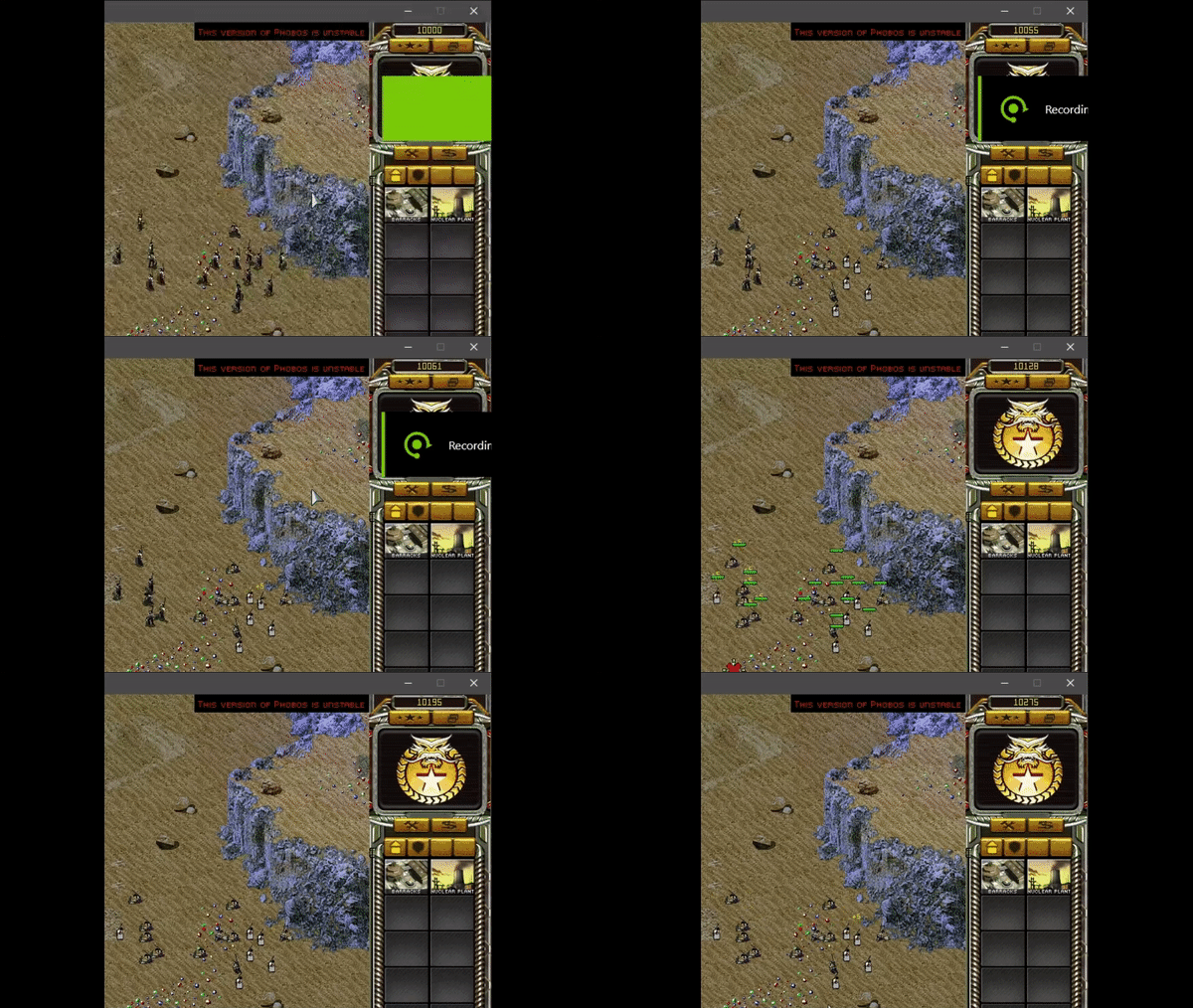
TransactMoney used in Rise of the East mod
Warheads can now give credits to its owner at impact.
TransactMoney.Displaycan be set to display the amount of credits given or deducted. The number is displayed in green if given, red if deducted and will move upwards after appearing.TransactMoney.Display.AtFirerif set, makes the credits display appear on firer instead of target. If set and firer is not known, it will display at target regardless.TransactMoney.Display.Housesdetermines which houses can see the credits display.TransactMoney.Display.Offsetis additional pixel offset for the center of the credits display, by default (0,0) at target’s/firer’s center.
In rulesmd.ini:
[SOMEWARHEAD]                        ; Warhead
TransactMoney=0                      ; integer - credits added or subtracted
TransactMoney.Display=false          ; boolean
TransactMoney.Display.AtFirer=false  ; boolean
TransactMoney.Display.Houses=All     ; Affected House Enumeration (none|owner/self|allies/ally|team|enemies/enemy|all)
TransactMoney.Display.Offset=0,0     ; X,Y, pixels relative to default
Launch superweapons on impact
Superweapons can now be launched when a warhead is detonated.
LaunchSWspecifies the superweapons to launch when the warhead is detonated.LaunchSW.RealLaunchcontrols whether the owner who fired the warhead must own all listed superweapons and sufficient fund to supportMoney.Amout. Otherwise they will be launched out of nowhere.LaunchSW.IgnoreInhibitorsignoresSW.Inhibitors/SW.AnyInhibitorof each superweapon, otherwise only non-inhibited superweapons are launched.LaunchSW.IgnoreDesignatorsignoresSW.Designators/SW.AnyDesignatorrespectively.
Note
For animation warheads/weapons to take effect, Damage.DealtByInvoker must be set.
Also, due to the nature of some superweapon types, not all superweapons are suitable for launch.
In rulesmd.ini:
[SOMEWARHEAD]                    ; Warhead
LaunchSW=                        ; list of superweapons
LaunchSW.RealLaunch=true         ; boolean
LaunchSW.IgnoreInhibitors=false  ; boolean
LaunchSW.IgnoreDesignators=true  ; boolean
Remove disguise on impact
Warheads can now remove disguise from disguised infantry such as spies. This will work even if the disguised was acquired by default through
PermaDisguise.
In rulesmd.ini:
[SOMEWARHEAD]         ; Warhead
RemoveDisguise=false  ; boolean
Reveal map for owner on impact
Warheads can now reveal the entire map on impact.
Reveal only applies to the owner of the warhead.
In rulesmd.ini:
[SOMEWARHEAD]  ; Warhead
SpySat=false   ; boolean
Shroud map for enemies on impact
Warheads can now shroud the entire map on impact.
Shroud only applies to enemies of the warhead owner.
In rulesmd.ini:
[SOMEWARHEAD]  ; Warhead
BigGap=false   ; boolean
Trigger specific NotHuman infantry Death anim sequence
Warheads are now able to trigger specific
NotHuman=yesinfantryDeathanim sequence using the corresponding tag. It’s value represents sequences fromDie1toDie5.
In rulesmd.ini:
[SOMEWARHEAD]            ; Warhead
NotHuman.DeathSequence=  ; integer (1 to 5)
Weapons
AreaFire target customization
You can now specify how AreaFire weapon picks its target. By default it targets the base cell the firer is currently on, but this can now be changed to fire on the firer itself or at a random cell within the radius of the weapon’s
Rangeby settingAreaFire.Targettoselforrandomrespectively.AreaFire.Target=selfrespects normal targeting rules (Warhead Verses etc.) against the firer itself.AreaFire.Target=randomignores cells that are ineligible or contain ineligible objects based on listed values in weapon’sCanTarget&CanTargetHouses.
In rulesmd.ini:
[SOMEWEAPON]         ; WeaponType
AreaFire.Target=base ; AreaFire Target Enumeration (base|self|random)
Burst.Delays
Allows specifying weapon-specific burst shot delays. Takes precedence over the old
BurstDelayXlogic available on VehicleTypes, functions with Infantry & BuildingType weapons (AircraftTypes are not supported due to their weapon firing system being completely different) and allows every shot ofBurstto have a separate delay instead of only first four shots.If no delay is defined for a shot, it falls back to last delay value defined (f.ex
Burst=3andBurst.Delays=10would use 10 as delay for all shots).Using
-1as delay reverts back to old logic (BurstDelay0-3for VehicleTypes if available or random value between 3-5 otherwise) for that shot.
In rulesmd.ini:
[SOMEWEAPON]     ; WeaponType
Burst.Delays=-1  ; integer - burst delays (comma-separated) for shots in order from first to last.
Feedback weapon
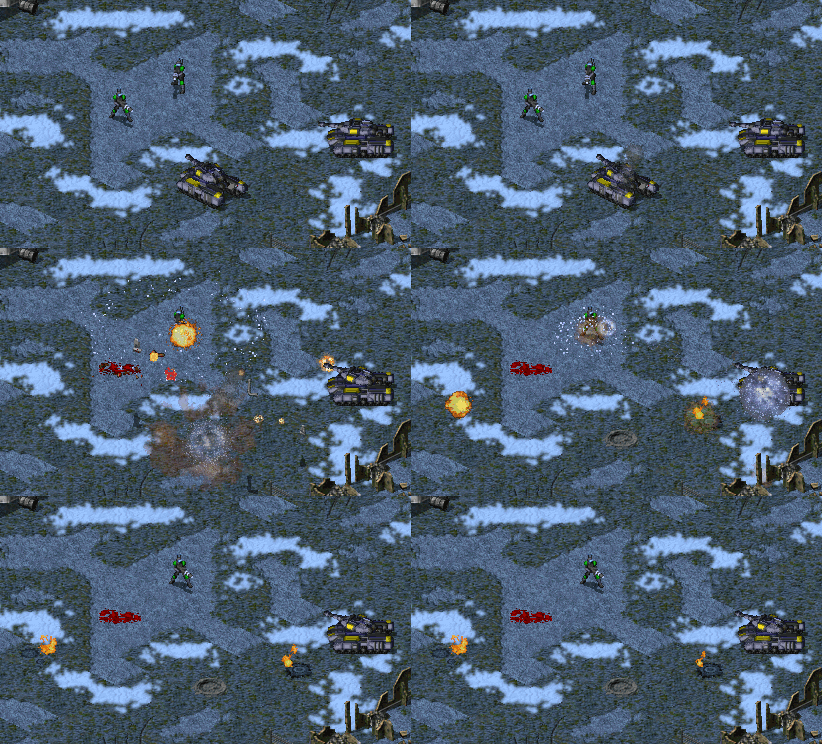
FeedbackWeapon used to apply healing aura upon firing a weapon (Project Phantom)
You can now specify an auxiliary weapon to be fired on the firer itself when a weapon is fired.
FireInTransportsetting of the feedback weapon is respected to determine if it can be fired when the original weapon is fired from insideOpenTopped=truetransport. If feedback weapon is fired, it is fired on the transport.OpenToppedDamageMultiplieris not applied on feedback weapons.
In rulesmd.ini:
[SOMEWEAPON]     ; WeaponType
FeedbackWeapon=  ; WeaponType
Radiation enhancements
In addition to allowing custom radiation types, several enhancements are also available to the default radiation type defined in
[Radiation], such as ability to set owner & invoker or deal damage against buildings. See Custom Radiation Types for more details.
Strafing aircraft weapon customization
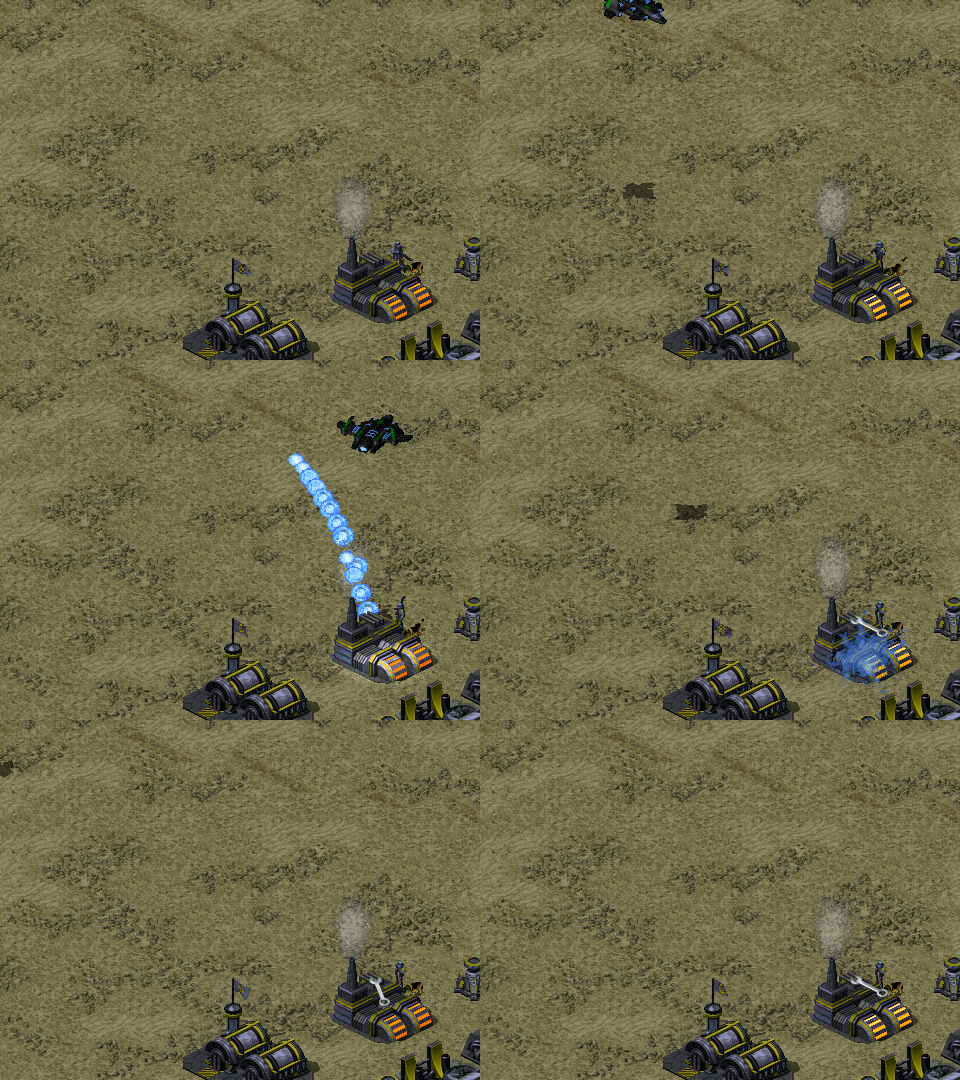 Strafing aircraft weapon customization in Project Phantom
Some of the behavior of strafing aircraft weapons (weapon projectile has
ROTbelow 2) can now be customized.Strafing.Shotscontrols the number of times the weapon is fired during a single strafe run.Ammois only deducted at the end of the strafe run, regardless of the number of shots fired. Valid values range from 1 to 5, any values smaller or larger are effectively treated same as either 1 or 5, respectively. Defaults to 5.Strafing.SimulateBurstcontrols whether or not the shots fired during strafing simulate behavior ofBurst, allowing for alternating firing offset. Only takes effect if weapon hasBurstset to 1 or undefined. Defaults to false.
In rulesmd.ini:
[SOMEWEAPON]                  ; WeaponType
Strafing.Shots=5              ; integer
Strafing.SimulateBurst=false  ; boolean
Weapon targeting filter
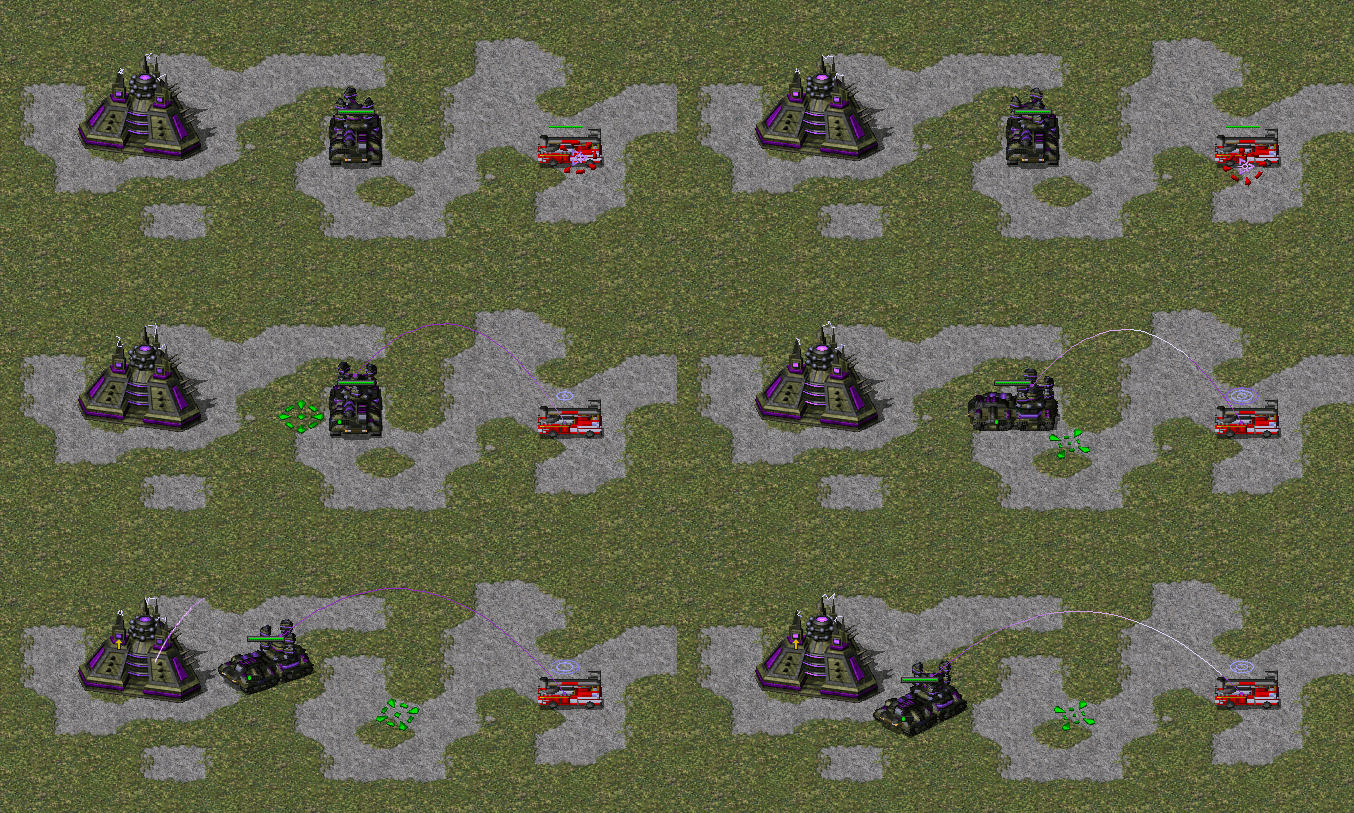 `Weapon target filter - different weapon used against enemies & allies as well as units & buildings (Project Phantom)
You can now specify which targets or houses a weapon can fire at. This also affects weapon selection, other than certain special cases where the selection is fixed.
Note that
CanTargetexplicitly requires eitheralloremptyto be listed for the weapon to be able to fire at cells containing no TechnoTypes.
In rulesmd.ini:
[SOMEWEAPON]         ; WeaponType
CanTarget=all        ; list of Affected Target Enumeration (none|land|water|empty|infantry|units|buildings|all)
CanTargetHouses=all  ; list of Affected House Enumeration (none|owner/self|allies/ally|team|enemies/enemy|all)